
A client's records arrive late, incomplete and scattered across email, attachments and messages. The team then spends valuable time chasing missing information, correcting classifications and moving review work closer to the filing deadline. For UK practice owners and client managers, accounting workflow automation only solves part of that problem. The lasting improvement comes from combining clear expectations, a reliable accounting client portal, sensible reminders, a fair late-record policy and human review at the points where judgement still matters.
This guide shows how to build that process, from mapping the current workflow through to client adoption, measurement and MTD controls. It also includes practical message examples and a reusable accounting workflow template structure.
Table of Contents
- Why late records stall even good UK practices
- How to map and standardise your current workflow
- Where to automate first for the biggest payoff
- Choosing and connecting MTD ready tools and portals
- Getting clients on time with expectations and KPIs
- Templates pitfalls and your next practical move
- Full episode transcript
Why late records stall even good UK practices
Late records rarely result from one careless client. More often, the practice has allowed several small uncertainties to remain in place. The client doesn't know exactly what must be sent, the deadline isn't tied to a clear consequence, the portal feels optional and the team keeps rescuing the process through individual follow-up.
That rescue work hides the cost. A bookkeeper may begin processing without a complete bank statement, a reviewer may hold work while waiting for clarification, and the manager may need to reshuffle jobs before a return can be checked properly. The practice appears busy, but capacity is being consumed by avoidable handoffs and rework.
Compliance pressure makes weak routines visible
Digital tax processes have made record collection a recurring operational responsibility rather than a year-end exercise. Since April 2022, VAT-registered businesses have been required to keep digital records and submit VAT returns through MTD-compatible software. In HMRC's evaluation, 67% of businesses believed compatible software reduced the likelihood of mistakes in at least one aspect of record-keeping, while 80% said the process was easy to use. These findings are set out in HMRC's technical note on Making Tax Digital.
The practical lesson for a practice is straightforward. A client portal and automated reminders can make collection easier, but neither replaces a defined process. Clients need to understand what “complete” means, when information is due and what happens if it isn't received.
Practical rule: A deadline without a stated next step is a suggestion.
Success should therefore be defined in operational terms. The practice receives complete records by the agreed date, the team can process them without repeated chasing, reviewers receive work with exceptions clearly marked and submissions aren't compressed into the final available window.
The behaviour and process fix
A workable system usually has six connected parts:
- Expectation: The engagement explains the information required, submission route and agreed date.
- Collection: Clients use one designated channel, preferably an accounting client portal rather than several inboxes.
- Reminder: Messages are scheduled around the client's deadline and written in plain language.
- Escalation: Late records trigger a consistent policy, not an improvised reaction.
- Control: Staff review unusual items, permissions, reconciliations and final submissions.
- Measurement: Managers track timeliness, exceptions, rework and review capacity.
A practice can then judge automation by whether it releases controlled capacity and protects filing quality, not by how many software features have been switched on.
How to map and standardise your current workflow
Automation should begin with a process map, not a purchase decision. The practice needs to see how a document moves from the client to the submitted return, including every manual touch, handoff and point where work waits.
Start with one representative client type. Trace the route from source documents through capture, transaction posting, reconciliation, review, approval and HMRC submission. Record who owns each stage, which system holds the information and what causes the work to move forward.
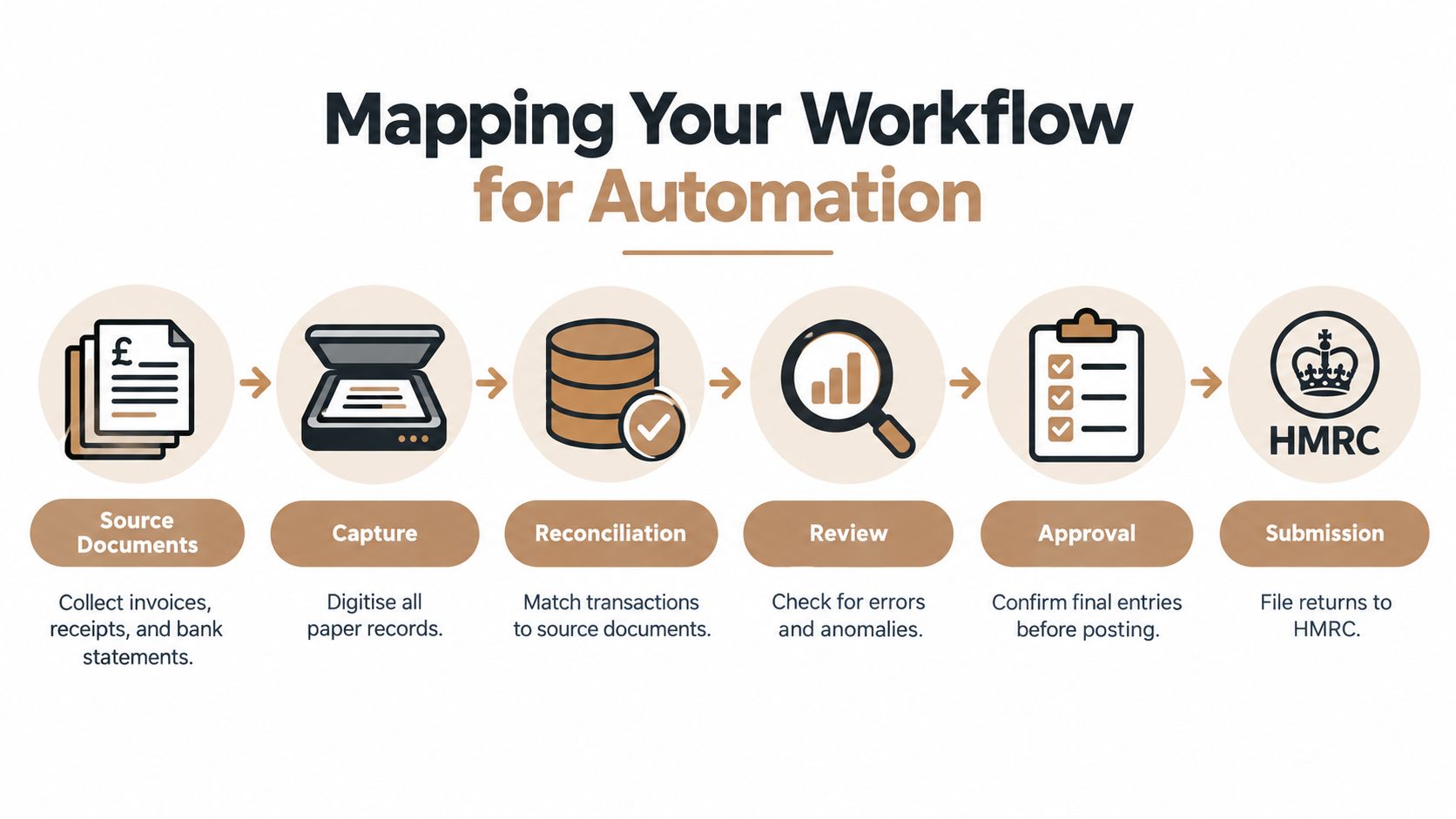
Six stages to document
-
Collect source documents. Define the required invoices, receipts, bank statements and client explanations. Specify the accepted format and the single destination for submission.
-
Capture the data. Identify how documents enter the bookkeeping system and where staff still re-key information. Note whether a missing document can be spotted immediately or only during review.
-
Reconcile transactions. Set out how bank entries, invoices and supporting records are matched. State who investigates unreconciled items and how those items are marked.
-
Review exceptions. Separate routine transactions from unusual, incomplete or ambiguous entries. An exception code should tell the next person what needs checking.
-
Approve the records. Set approval thresholds and identify the person responsible for final sign-off. Approval shouldn't mean that every transaction receives the same level of manual attention.
-
Submit and retain evidence. Record the submission route, required authorisation and evidence retained in the file. The process should make it clear who confirms that the return or update has been accepted.
Standardise the rules before automating them. That includes the chart of accounts, VAT treatment, approval thresholds, naming conventions and exception codes. If two team members classify the same transaction differently, software will make inconsistent treatment faster.
Establish a baseline before changing anything
The baseline doesn't need to be elaborate. Review a sample of active clients and record spreadsheet use, unreconciled items, late records, manual-touch time and rework. Also note where staff chase clients, because collection work is often the hidden bottleneck.
A useful process map shows the difference between the documented workflow and the actual workflow. The documented version may say that clients upload records to the portal, while the actual version may involve an email attachment, a team member downloading it and a second request for the missing bank statement.
Practices looking for further process ideas can use this guide to improve your team's workflow alongside an internal review. AccountantShe's systems and processes toolkit can also provide a structured starting point for documenting responsibilities, repeatable steps and internal controls.
A clean process map is a control document. It should tell a new team member what happens, who owns it and what evidence proves completion.
Where to automate first for the biggest payoff
Start with work that occurs frequently, follows agreed rules and has a clear route for exceptions. High-volume posting is usually safer than automating a judgement-heavy task before the practice has defined what correct treatment means.
Good candidates and protected controls
Bank-feed posting, receipt capture, routine invoice processing, client reminders and missing-record chasers can often be automated under supervision. The system identifies a trigger, applies an approved rule and sends anything outside that rule to a person.
Keep human review visible around unusual transactions, disputed classifications, reconciliations, MTD authorisations and final sign-off. Treat every automated action as a proposal. A person still applies the appropriate level of checking before it becomes a professional conclusion.
A 2025 survey of 100 UK accountants found that 66% were already using AI within their firm or finance department, while a further 25% planned to adopt it; 9% had no plans to do so. Among current users, 70% used generative AI, 54% used machine learning and 46% used automation for routine processes, including payroll, invoice processing and bookkeeping, according to industry research.
Those figures show adoption, not reliable delivery. Build a control matrix before switching on a ruleset:
| Control area | System action | Human check | Escalation |
|---|---|---|---|
| Client records | Send scheduled portal reminder | Confirm the request matches the client's service and period | Manager reviews repeated late submissions |
| Transaction posting | Apply approved bank-feed or receipt rule | Sample-check entries and investigate exceptions | Reclassify, document and update the rule |
| Reconciliation | Match routine items | Review unreconciled balances and unusual movements | Hold processing where evidence is incomplete |
| MTD connection | Maintain the authorised software link | Check client authority, account connection and permissions | Reauthorise or pause the workflow |
| Submission | Prepare the return or update | Complete final review and sign-off | Record the reason for non-submission or rework |
Pilot before expanding the ruleset
Segment clients by bookkeeping maturity, transaction complexity and MTD exposure. A digitally confident client with consistent records may suit an early pilot. A client with incomplete records, unusual VAT treatment or several manual workarounds may need preparation first.
Choose a small cohort and test edge cases before wider rollout. Check VAT treatment, credit notes, private-use items, missing documents, duplicate uploads and transactions requiring explanation. Test the fallback process too. If a connection fails or a document cannot be read, staff need a defined manual route that does not create a second uncontrolled process.
The strongest design is straight-through processing with deliberate control points. Routine work moves quickly, while exceptions remain visible to the people qualified to resolve them. Review the exception log after each cycle, then adjust the rule, training or client instruction where the same problem keeps returning.
Choosing and connecting MTD ready tools and portals
Tool selection should follow the workflow map. A portal that collects files but doesn't connect cleanly with the bookkeeping process may create another download-and-upload task. A bookkeeping system that posts transactions efficiently but doesn't support client communication may leave the practice chasing records manually.
HMRC research found that 76% of businesses using fully compatible MTD software experienced at least one benefit, compared with 54% using bridging software connected to spreadsheets. The comparison appears in HMRC's evaluation of MTD for VAT. End-to-end compatibility should therefore be preferred where it fits the client and the service, while spreadsheet bridging should be treated as a controlled transition rather than the desired end state.
Connect the workflow in the right order
Configure the core bookkeeping environment first. Then connect bank feeds, receipt capture, the practice-management system and the accounting client portal. Each connection should have a named owner, a documented purpose and a fallback procedure.
Before the first submission, confirm:
- Client authority: The agent holds the correct authorisation for the client and service.
- HMRC connection: The software is linked through the appropriate authorisation journey.
- Agent access: The relevant Agent Services Account and user permissions are in place.
- Accounting period: The selected period matches the client's circumstances.
- Mandatory fields: Required information is complete before submission can proceed.
- Reconciliation status: Unresolved balances above the practice threshold block final sign-off.
- Evidence: Approval and submission records are retained in the client file.
For MTD for Income Tax, the period setting deserves particular attention. Software defaults to a 6 April to 5 April period, but a business using a 1 April to 31 March accounting period should select calendar update periods before the first update. HMRC states that the choice cannot be changed for the rest of the tax year once the first quarterly update has been sent, as explained in Agent Update issue 143.
Compare design choices before committing
| Design choice | Best use | Risk to control |
|---|---|---|
| End-to-end compatible software | Clients who can adopt a complete digital record process | Incorrect setup can spread errors across the workflow |
| Spreadsheet bridging | Transitional cases where a full change cannot happen immediately | Re-entry, missing links and weaker visibility |
| Central accounting client portal | Standardised collection, reminders and evidence | Clients may continue sending information elsewhere |
| Automated posting rules | Repetitive transactions with stable treatment | Misclassification if rules aren't reviewed |
| Human approval gates | Unusual items, reconciliations and final submission | Queues can grow if ownership isn't clear |
AccountantShe’s MTD IT practice blueprint is relevant for practices building client-readiness processes around digital records, permissions and submissions. The technology matters, but configuration discipline matters more. A connected stack should make an unsafe submission harder, not merely make a fast submission easier.
Getting clients on time with expectations and KPIs
Clients provide records on time when the practice makes the required behaviour clear, convenient and consistent. A portal supports that process, but it cannot change habits while clients can still email photographs, miss deadlines without consequence or receive different instructions from different staff members.
Set expectations during onboarding. State what the client must provide, where to upload it, when it is due and how late records affect delivery. Keep the wording firm without sounding hostile. The deadline forms part of the agreed service process, rather than an arbitrary request from the bookkeeping team.
Use a predictable reminder sequence
Use an advance reminder, a due-date message and a late-record escalation. Every message should name the period, identify outstanding items and give the client one clear action.
Advance reminder
Your records for [period] are due by [date]. Please upload the bank statements, invoices, receipts and explanations listed in your portal checklist. Uploading everything together gives the team time to process and review the records within the agreed timetable.
Due-date reminder
The records for [period] are due today. Please upload the outstanding items through the portal by [time]. If an item is unavailable, reply through the portal with an explanation so the team can assess the next step.
Late-record escalation
The records for [period] remain outstanding. The agreed timetable may no longer be available, and additional work may be required if the information arrives after the processing cut-off. Please upload the records by [new date], or contact the practice promptly if an issue is preventing submission.
Publish the late-record policy before anyone needs to apply it. Explain the cut-off, its effect on turnaround, how additional chasing is treated and the route for urgent exceptions. Consistent application protects the relationship because staff follow an agreed process instead of making a personal judgement.
Measure capacity, not just software activity
Set a baseline before rollout and compare it with performance afterward. Useful measures include:
- On-time receipt: The proportion of clients providing complete records by the agreed date.
- Review turnaround: The time between complete records arriving and review being completed.
- Exception ageing: How long unresolved items remain open.
- Rework: Returns to processing caused by incomplete information or classifications.
- Client chasing: The volume and type of reminders sent by the team.
- Service economics: The relationship between delivery time, fees and margin.
- Client value: Capacity redirected to faster responses, planning or advisory work.
A 2025 UK study of 515 accountants and bookkeepers reported that AI-enabled work took 31% less time on average, equivalent to 18 hours and 53 minutes saved per week for the average practice, while 46% reported measurable productivity gains. The figures appear in recent UK sector research. The gap deserves attention. Released time only turns into capacity once the practice assigns it somewhere specific. Decide that destination before the rollout, not after.
Introduce portal adoption in waves. Segment clients, provide a short demonstration, monitor failed uploads and contact clients who repeatedly use the wrong channel. A practical resource for collecting client data consistently can support the change. Keep the human follow-up for clients whose behaviour or circumstances fall outside the standard process.
Templates pitfalls and your next practical move
A useful accounting workflow template should be specific enough to run the job and flexible enough to suit different client types. It should contain:
- Client profile: Service, period, MTD exposure, complexity and named practice owner.
- Collection checklist: Required documents, submission channel and due date.
- Reminder schedule: Advance reminder, due-date reminder and escalation wording.
- Processing rules: Chart-of-accounts treatment, VAT decisions, approval thresholds and exception codes.
- Control gates: Reconciliation, permission, authorisation and final review checks.
- Evidence record: Upload status, unresolved items, approvals and submission confirmation.
- KPI fields: Timeliness, review turnaround, exception ageing, rework and chasing activity.
The common failures are predictable. Poor source data produces poor automated postings. A stale permission can interrupt an otherwise complete MTD workflow. A rule built from one client’s transactions can misclassify another client’s records. A portal that isn’t enforced becomes another inbox.
Prepare for MTD for Income Tax
From 6 April 2026, MTD for Income Tax applies to sole traders and landlords whose qualifying income from self-employment and property exceeded £50,000 in the 2024 to 2025 tax year, unless exempt. The workflow must use compatible software to create, store and correct digital records of income and expenses, then send quarterly updates to HMRC, as set out in HMRC’s guidance for taxpayers signed up to MTD for Income Tax.
For standard update periods, digital records must be created from 6 April 2026. The first quarterly update, covering the opening period, is due by 7 August 2026, followed by 7 November 2026, 7 February 2027 and 7 May 2027, according to HMRC’s guidance on preparing for MTD for Income Tax. The annual submission remains a separate stage, so the practice should create recurring tasks rather than treating MTD as a single year-end event.
A sensible next move is a controlled review of one client segment. Map the current process, select the first automation candidate, write the human checks, confirm permissions and measure the baseline before changing the workflow. Accounting advice may be needed where client circumstances, accounting periods, VAT treatment or agent authority are unclear.
Accountant She Ltd provides practical accountancy training, courses, templates and resources for practice owners, accountants and bookkeepers, including materials that support client engagement and repeatable practice systems.
Full episode transcript
The full episode transcript should be inserted here after it has been checked against the supplied source recording and transcript, with speaker names and available timestamps preserved. The source episode is available at Fining clients for late records and, and the supplied transcript should be cleaned for filler and repetition without adding wording, claims or quotations that do not appear in the original.